Announcement Center
1. I can’t receive SMS or Email
1) SMS
First check whether you have set SMS blocking. If not, please contact CoinW customer service personnel and provide your phone number, and we will contact the mobile operators.
2) Email
First check if there is emails from CoinW in your junk. If not, please contact CoinW customer service personnel.
2.Why didn’t my deposit arrive?
1) Withdrawal failed
Please refer to the platform you withdraw from for the details about your withdrawal.
2) Withdrawal succeeded
- A successful withdrawal means that the platform you withdraw from has completed related operations.
- Check the block confirmation status. You can copy the TXID and search it in the corresponding block explorer. The block congestion and other situations may lead to that it will a longer time to complete block confirmation.
- After block confirmation, CoinW will complete the deposit as soon as possible. If it still didn’t arrive, please contact CoinW customer service personnel.
3.Why didn’t my withdrawal arrive?
1) Withdrawal failed
Please contact CoinW for the details about your withdrawal.
2) Withdrawal succeeded
- A successful withdrawal means that CoinW has completed the transfer.
- Check the block confirmation status. You can copy the TXID and search it in the corresponding block explorer. The block congestion and other situations may lead to that it will a longer time to complete block confirmation.
- After block confirmation, please contact the platform you withdraw to if it still didn’t arrive.
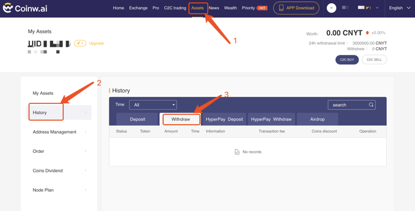
*View your TXID in Assets-History-Withdraw
Common Block Explorers:
- ETH(ERC20)https://etherscan.io
- USDT https://omniexplorer.info/
- BTC https://btc.com
- BCH https://blockchair.com/bitcoin-cash/blocks
- LTC http://explorer.litecoin.net/chain/Litecoin
- EOS https://eospark.com/account/
- HC http://explorer.h.cash/
- QTUM https://explorer.qtum.org/
4.Why can’t I open CoinW site?
CoinW site: www.coinw.ai
If you can’t open CoinW site, please check your network settings first. If there is a system upgrade, please wait or login with CoinW APP.
5.Why can’t I open CoinW APP?
1) Android
- Check if it is the latest version. APP download link: https://www.coinw.ai/dowload/index.html
- Switch between 4G and WiFi and choose the best
2) iOS
- Check if it is the latest version. APP download link: https://www.coinw.ai/dowload/index.html
- Switch between 4G and WiFi and choose the best
6.Frozen tokens
1) If there is a pending order, your tokens will be frozen temporarily. You can cancel the order.
2) If your assets are frozen because of abnormal orders, please contact CoinW customer service personnel.
PS: Please form the habit of taking a snapshot of the pending orders, which can help to unfreeze the orders quickly by cancelling the orders.
7.Identity verification
1) Login your CoinW account and then click “Account”
2) Click “ID Verification”
3) Upload photos according to the tips
8.Account Suspension
1) In order to protect user assets and prevent account from being hacked, CoinW has set the triggers of risk control. When you triggered it, you will automatically be banned to withdraw for 24 hours. Please wait patiently and your account will be unfrozen after 24 hours. The trigger conditions are as follows:
a.Change phone number;
b.Change login password;
c.Retrieve password;
d.Disable Google Authenticator;
e.Change trade password;
f.Disable SMS authentication.
2) If the account was detected by the system as illegal high-frequency arbitrage, which has seriously affected the market’s normal fairness, the security alert will be triggered and the account will be frozen.
9.Google Authenticator
For any question about Google Authenticator, like failure to set up and incorrect code, please contact the customer service personnel on CoinW web.
10.Fees
| Fiat deposit | Free | |
| Token deposit | Free | |
| Fiat withdrawal | 0.7%, Minimum 2 CNYT | |
| Token withdrawal | Refer to “Fee instruction” at the bottom of home page | |
| Trading Fee | Buy | 0.2%, deduct from the bought tokens |
| Sell | 0.2%, deduct from the sold fiats | |
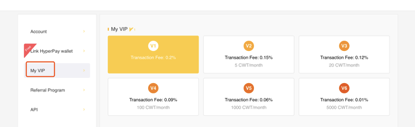
Instruction on VIP Fee Discount:
- V2: 1.5‰ trading fee, 5 CWT per month
- V3: 1.2‰ trading fee,20 CWT per month
- V4: 0.9‰ trading fee, 100 CWT per month
- V5: 0.6‰ trading fee, 1,000 CWT per month
- V6: 0.1‰ trading fee, 5,000 CWT per month
How to Buy CoinW VIP?
Click Account-My VIP to buy
11.How to set and change login/trade password?
1) Enter www.coinw.ai and login. Click “Account”
2) Click “Change”. Enter the information as required and then click “Submit”.
12.How to get my referral id?
Log in CoinW account (on Web www.coinw.ai). Click Account-Referral Program
1. I can’t receive SMS or Email
1) SMS
First check whether you have set SMS blocking. If not, please contact CoinW customer service personnel and provide your phone number, and we will contact the mobile operators.
2) Email
First check if there is emails from CoinW in your junk. If not, please contact CoinW customer service personnel.
2.Why didn’t my deposit arrive?
1) Withdrawal failed
Please refer to the platform you withdraw from for the details about your withdrawal.
2) Withdrawal succeeded
- A successful withdrawal means that the platform you withdraw from has completed related operations.
- Check the block confirmation status. You can copy the TXID and search it in the corresponding block explorer. The block congestion and other situations may lead to that it will a longer time to complete block confirmation.
- After block confirmation, CoinW will complete the deposit as soon as possible. If it still didn’t arrive, please contact CoinW customer service personnel.
3.Why didn’t my withdrawal arrive?
1) Withdrawal failed
Please contact CoinW for the details about your withdrawal.
2) Withdrawal succeeded
- A successful withdrawal means that CoinW has completed the transfer.
- Check the block confirmation status. You can copy the TXID and search it in the corresponding block explorer. The block congestion and other situations may lead to that it will a longer time to complete block confirmation.
- After block confirmation, please contact the platform you withdraw to if it still didn’t arrive.
*View your TXID in Assets-History-Withdraw
Common Block Explorers:
- ETH(ERC20)https://etherscan.io
- USDT https://omniexplorer.info/
- BTC https://btc.com
- BCH https://blockchair.com/bitcoin-cash/blocks
- LTC http://explorer.litecoin.net/chain/Litecoin
- EOS https://eospark.com/account/
- HC http://explorer.h.cash/
- QTUM https://explorer.qtum.org/
4.Why can’t I open CoinW site?
CoinW site: www.coinw.ai
If you can’t open CoinW site, please check your network settings first. If there is a system upgrade, please wait or login with CoinW APP.
5.Why can’t I open CoinW APP?
1) Android
- Check if it is the latest version. APP download link: https://www.coinw.ai/dowload/index.html
- Switch between 4G and WiFi and choose the best
2) iOS
- Check if it is the latest version. APP download link: https://www.coinw.ai/dowload/index.html
- Switch between 4G and WiFi and choose the best
6.Frozen tokens
1) If there is a pending order, your tokens will be frozen temporarily. You can cancel the order.
2) If your assets are frozen because of abnormal orders, please contact CoinW customer service personnel.
PS: Please form the habit of taking a snapshot of the pending orders, which can help to unfreeze the orders quickly by cancelling the orders.
7.Identity verification
1) Login your CoinW account and then click “Account”
2) Click “ID Verification”
3) Upload photos according to the tips
8.Account Suspension
1) In order to protect user assets and prevent account from being hacked, CoinW has set the triggers of risk control. When you triggered it, you will automatically be banned to withdraw for 24 hours. Please wait patiently and your account will be unfrozen after 24 hours. The trigger conditions are as follows:
a.Change phone number;
b.Change login password;
c.Retrieve password;
d.Disable Google Authenticator;
e.Change trade password;
f.Disable SMS authentication.
2) If the account was detected by the system as illegal high-frequency arbitrage, which has seriously affected the market’s normal fairness, the security alert will be triggered and the account will be frozen.
9.Google Authenticator
For any question about Google Authenticator, like failure to set up and incorrect code, please contact the customer service personnel on CoinW web.
10.Fees
| Fiat deposit | Free | |
| Token deposit | Free | |
| Fiat withdrawal | 0.7%, Minimum 2 CNYT | |
| Token withdrawal | Refer to “Fee instruction” at the bottom of home page | |
| Trading Fee | Buy | 0.2%, deduct from the bought tokens |
| Sell | 0.2%, deduct from the sold fiats | |
Instruction on VIP Fee Discount:
- V2: 1.5‰ trading fee, 5 CWT per month
- V3: 1.2‰ trading fee,20 CWT per month
- V4: 0.9‰ trading fee, 100 CWT per month
- V5: 0.6‰ trading fee, 1,000 CWT per month
- V6: 0.1‰ trading fee, 5,000 CWT per month
How to Buy CoinW VIP?
Click Account-My VIP to buy
11.How to set and change login/trade password?
1) Enter www.coinw.ai and login. Click “Account”
2) Click “Change”. Enter the information as required and then click “Submit”.
12.How to get my referral id?
Log in CoinW account (on Web www.coinw.ai). Click Account-Referral Program