FAQ
What is CoinW VIP?
CoinW VIP is a membership level system provided by the platform. Users can upgrade their VIP level by meeting certain trading volume or asset amount requirements. The higher the VIP level, the lower the trading fees, and there are opportunities to enjoy other platform benefits and exclusive services.
How to upgrade VIP?
WEB
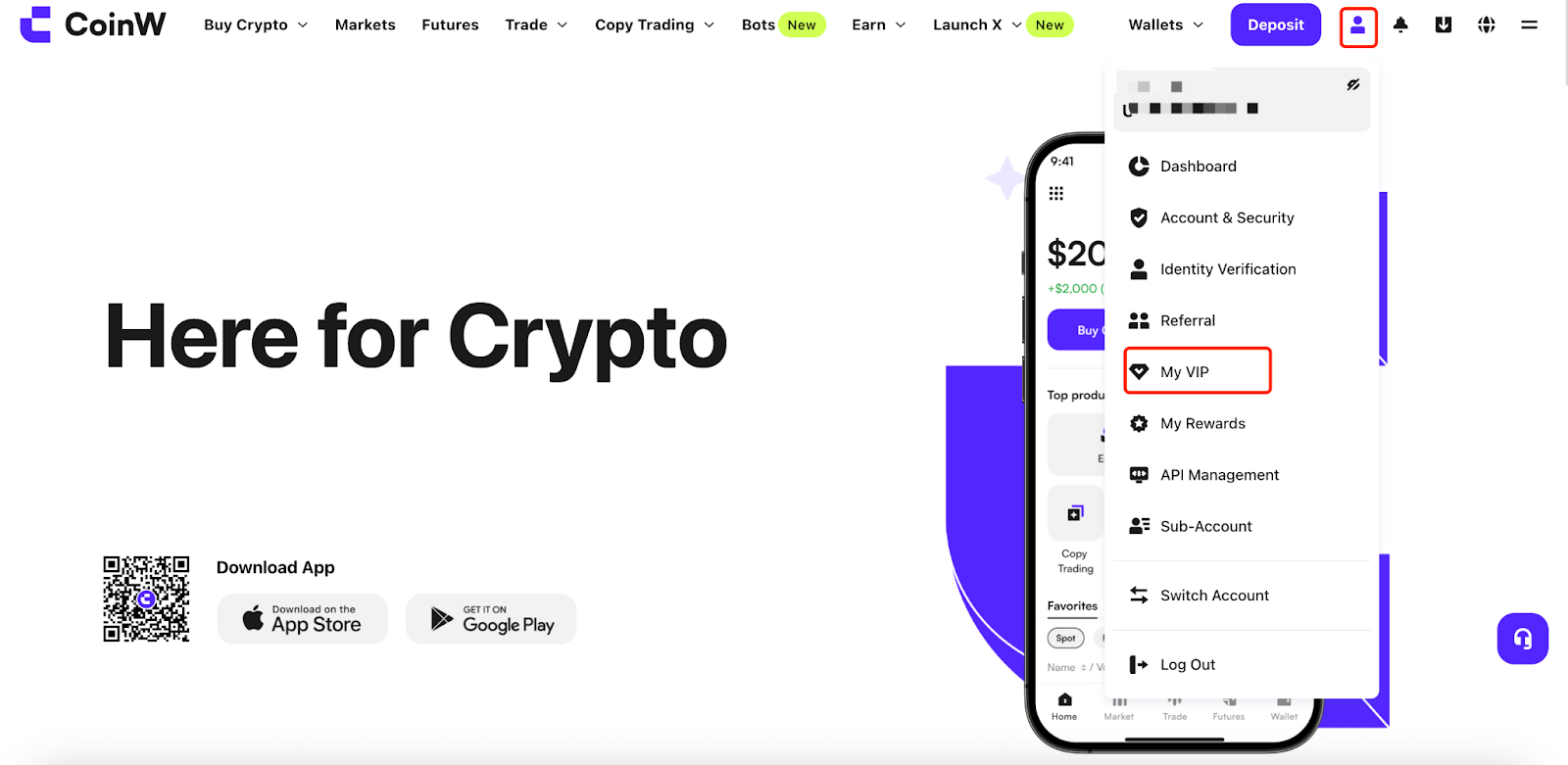
Log in to the CoinW official website, click the account icon in the upper right corner, and click the My VIP page.
APP
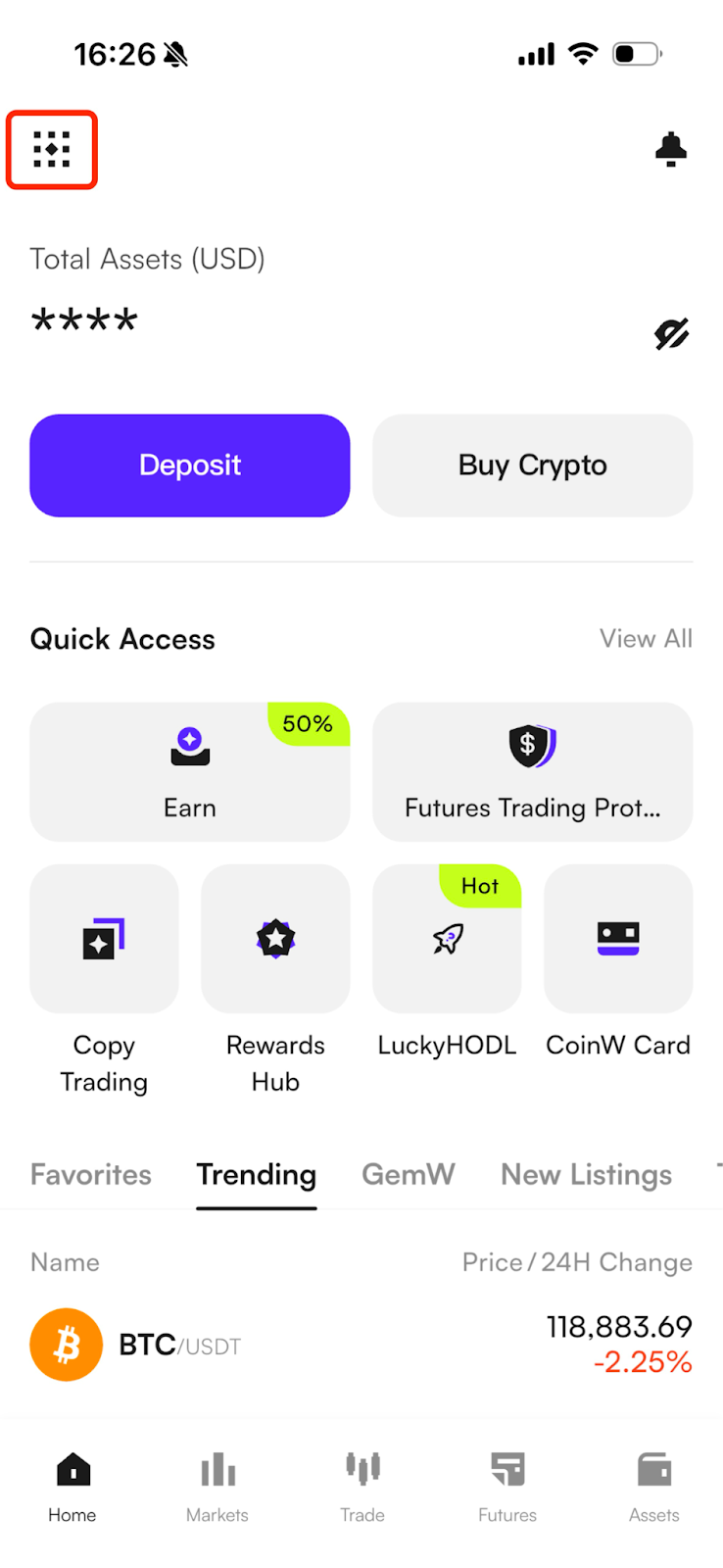
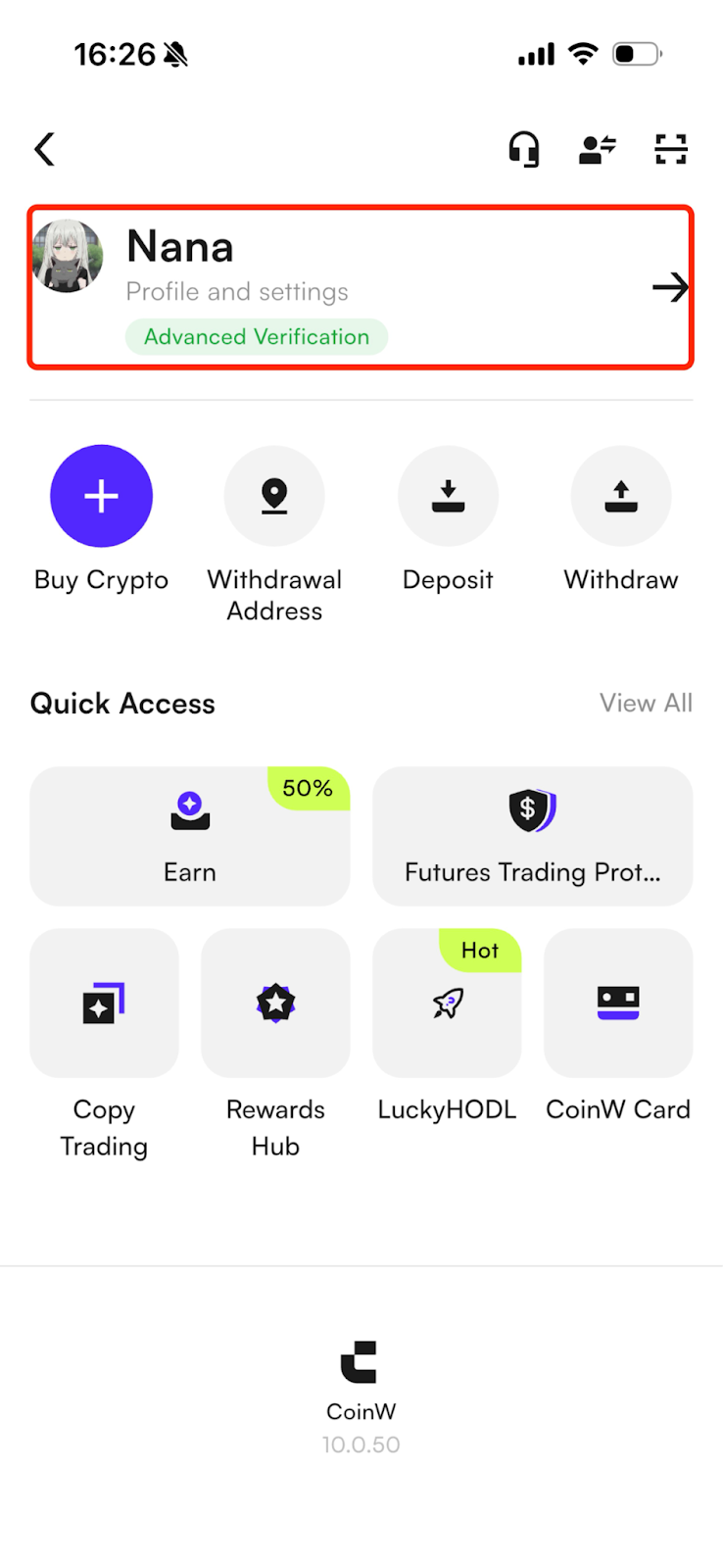
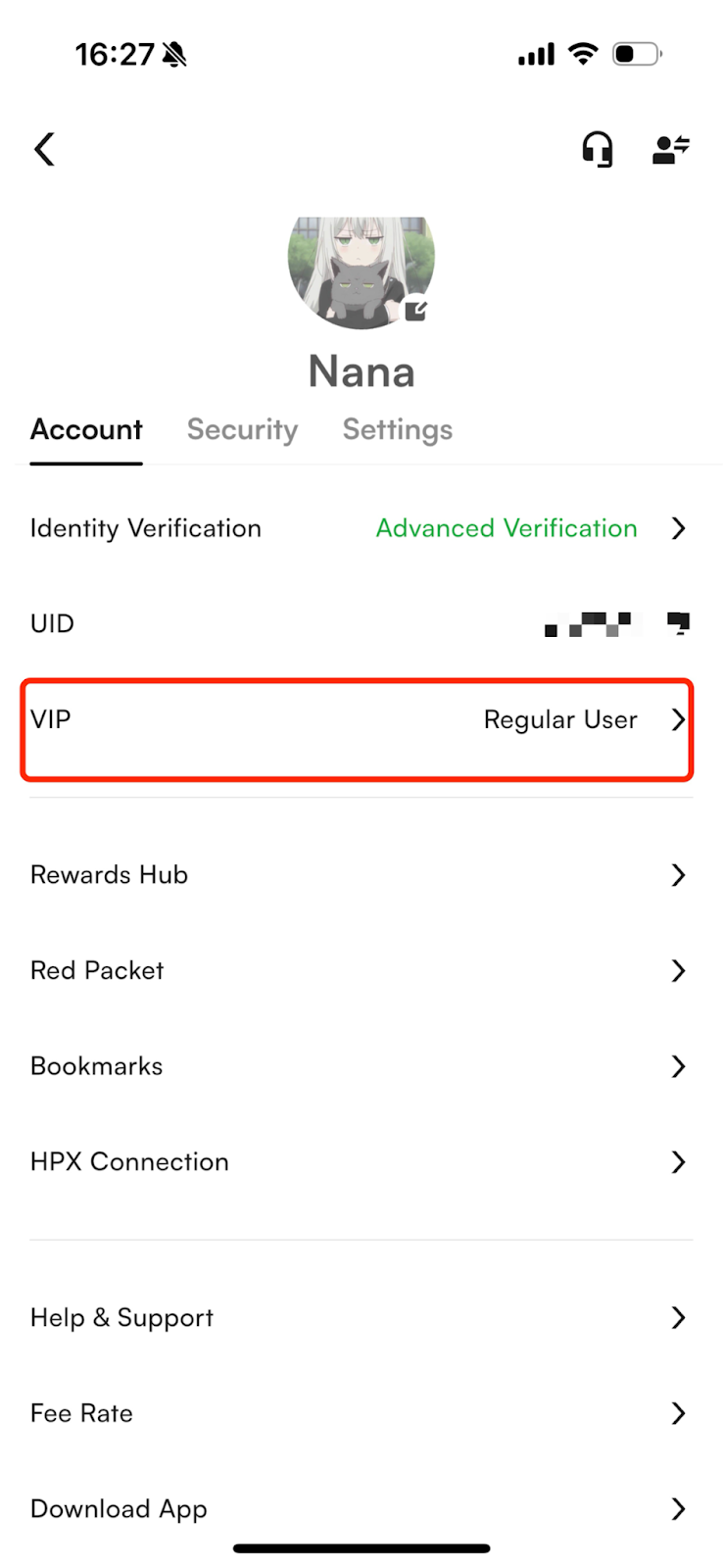
Open the CoinW App, go to the Personal Center, and then select the VIP option.
You can directly view your VIP level on this page and check the unlock requirements for each level.
VIP Levels and Benefits Comparison
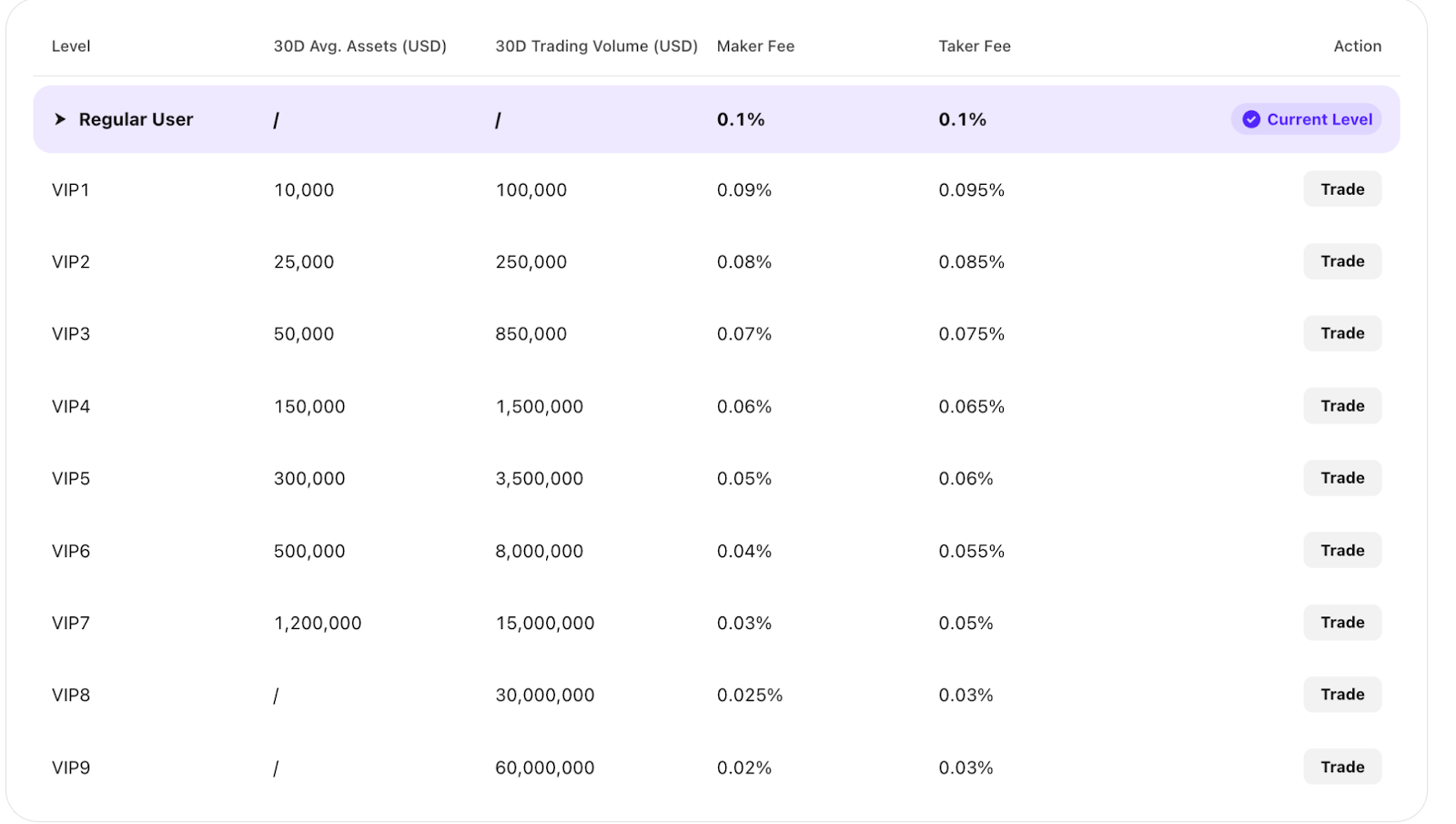
CoinW provides users with 9 VIP levels. Users can check the required trading volume or asset amount for each level on this page. Meeting the corresponding requirement will upgrade the user to that VIP level.
FAQ
Q: What is a Maker and a Taker?
A: Maker: A user who places an order at a specified price that does not immediately match with an existing order in the order book, but instead enters the order list to wait for execution.
Taker: A user who places an order at a specified price (matching an existing price in the order book) and immediately executes against an existing order.
Q: What are the rules for spot trading fee rate upgrades and downgrades?
A: The account can be upgraded when the average asset amount in the past 30 days or the asset amount on the current day meets the standard;
The account can also be upgraded when the trading volume in the past 30 days meets the standard;
The conditions are in an "OR" relationship — meeting any one of them will grant the corresponding VIP benefits. If none of the above conditions are met, the level will be downgraded accordingly.
Q: Past 30-day average asset amount
A: The platform takes a daily snapshot of the number of assets in each currency held by the user, converts them to the total asset amount, and uses the higher of the past 30-day average asset amount and the current day’s snapshot amount as the basis for determining the asset level.
Example: If the user’s past 30-day average asset amount is 1,000 USD and the current day’s snapshot asset amount is 5,000 USD, then the asset level is based on 5,000 USD.
Q: Past 30-day trading volume (USD)
A: The platform calculates the user’s spot trading volume daily, summing the total trading volume of all spot trading pairs over the past 30 days. For example, if a user traded BTC, ETH, and SOL in the past 30 days, the platform converts each trade into USD based on the exchange rate at the time of the trade (including trades in USDT, USDC, and other markets), and then calculates the total accumulated trading volume over the past 30 days.
Q: How to maintain spot trading fee rate level?
A: When a user first becomes a VIP or upgrades their VIP level, they will receive a 30-day downgrade protection period.
Q: When is the daily fee level updated?
A: The platform is expected to calculate the past 30-day trading volume and average asset amount daily from 00:00 to 08:00 (UTC+8) and update the latest fee rate level.
Q: VIP and Spot Invitation Rebates
A: After the spot trading fee rate system goes live, the spot invitation rebate rules will be adjusted as follows:
For normal user invitation rebates, when the invitee reaches VIP level 4 or above, spot trading fees generated by the invitee will no longer be eligible for commission or cashback.
What is CoinW VIP?
CoinW VIP is a membership level system provided by the platform. Users can upgrade their VIP level by meeting certain trading volume or asset amount requirements. The higher the VIP level, the lower the trading fees, and there are opportunities to enjoy other platform benefits and exclusive services.
How to upgrade VIP?
WEB
Log in to the CoinW official website, click the account icon in the upper right corner, and click the My VIP page.
APP
Open the CoinW App, go to the Personal Center, and then select the VIP option.
You can directly view your VIP level on this page and check the unlock requirements for each level.
VIP Levels and Benefits Comparison
CoinW provides users with 9 VIP levels. Users can check the required trading volume or asset amount for each level on this page. Meeting the corresponding requirement will upgrade the user to that VIP level.
FAQ
Q: What is a Maker and a Taker?
A: Maker: A user who places an order at a specified price that does not immediately match with an existing order in the order book, but instead enters the order list to wait for execution.
Taker: A user who places an order at a specified price (matching an existing price in the order book) and immediately executes against an existing order.
Q: What are the rules for spot trading fee rate upgrades and downgrades?
A: The account can be upgraded when the average asset amount in the past 30 days or the asset amount on the current day meets the standard;
The account can also be upgraded when the trading volume in the past 30 days meets the standard;
The conditions are in an "OR" relationship — meeting any one of them will grant the corresponding VIP benefits. If none of the above conditions are met, the level will be downgraded accordingly.
Q: Past 30-day average asset amount
A: The platform takes a daily snapshot of the number of assets in each currency held by the user, converts them to the total asset amount, and uses the higher of the past 30-day average asset amount and the current day’s snapshot amount as the basis for determining the asset level.
Example: If the user’s past 30-day average asset amount is 1,000 USD and the current day’s snapshot asset amount is 5,000 USD, then the asset level is based on 5,000 USD.
Q: Past 30-day trading volume (USD)
A: The platform calculates the user’s spot trading volume daily, summing the total trading volume of all spot trading pairs over the past 30 days. For example, if a user traded BTC, ETH, and SOL in the past 30 days, the platform converts each trade into USD based on the exchange rate at the time of the trade (including trades in USDT, USDC, and other markets), and then calculates the total accumulated trading volume over the past 30 days.
Q: How to maintain spot trading fee rate level?
A: When a user first becomes a VIP or upgrades their VIP level, they will receive a 30-day downgrade protection period.
Q: When is the daily fee level updated?
A: The platform is expected to calculate the past 30-day trading volume and average asset amount daily from 00:00 to 08:00 (UTC+8) and update the latest fee rate level.
Q: VIP and Spot Invitation Rebates
A: After the spot trading fee rate system goes live, the spot invitation rebate rules will be adjusted as follows:
For normal user invitation rebates, when the invitee reaches VIP level 4 or above, spot trading fees generated by the invitee will no longer be eligible for commission or cashback.