FAQ
Withdrawal Guide
If you wish to withdraw assets from your account to other exchanges or wallets, or to other CoinW accounts, you may use the platform's withdrawal function.
Blockchain Transfer
If you wish to withdraw CoinW's digital currency assets to other platforms or exchanges, you can choose to withdraw using an address. First, before withdrawing, you need to transfer the currency you wish to withdraw to your Fuding account.
WEB
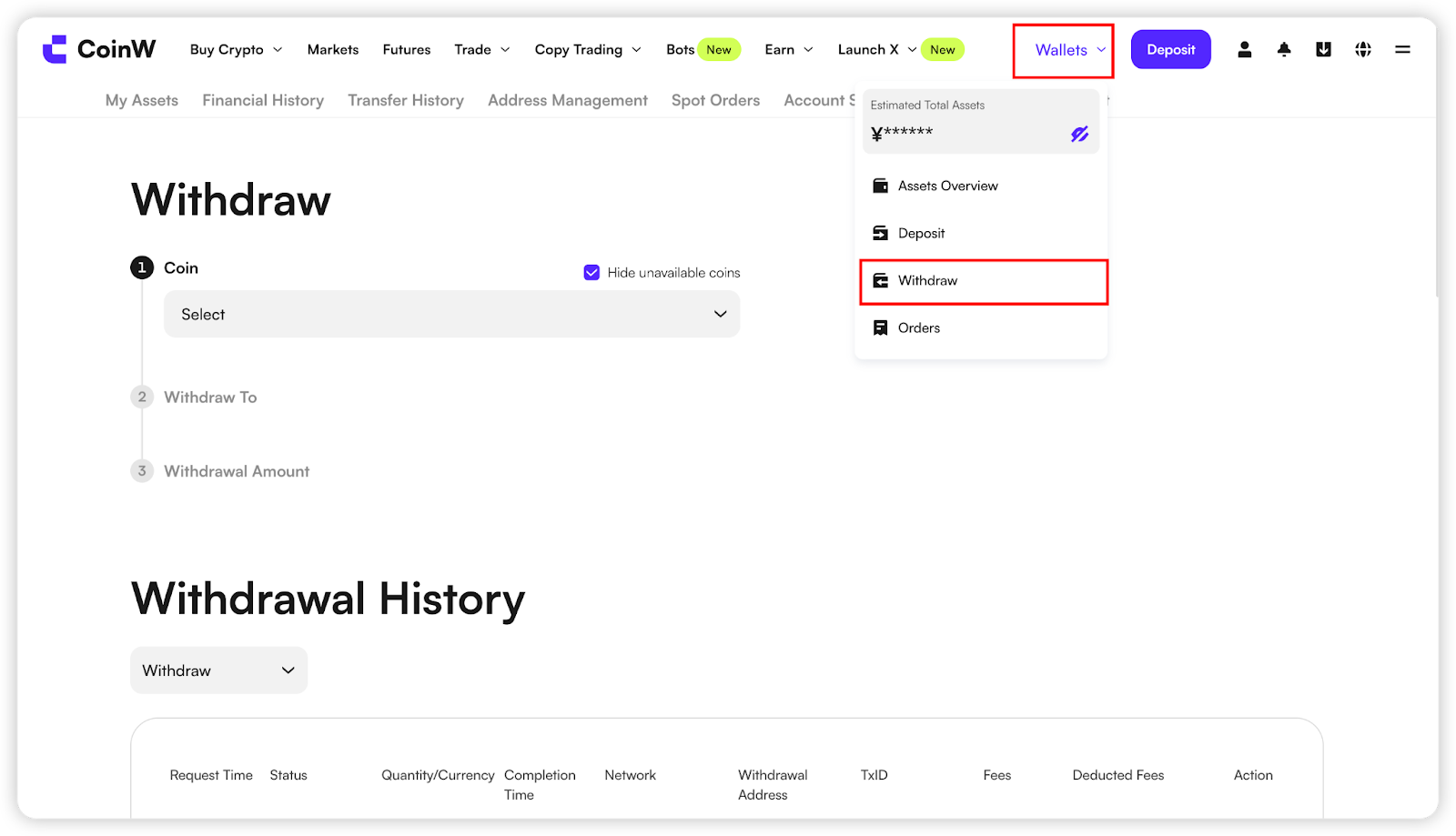
(1) Log in to the CoinW official website, click on 【Wallets】 in the upper right corner to enter the asset centre interface. Click the【Withdraw】button, select the cryptocurrency you wish to withdraw, choose 【Wallet Address】 as the withdrawal method, select the mainnet type, and input the destination address. Follow the on-screen instructions to complete the withdrawal process
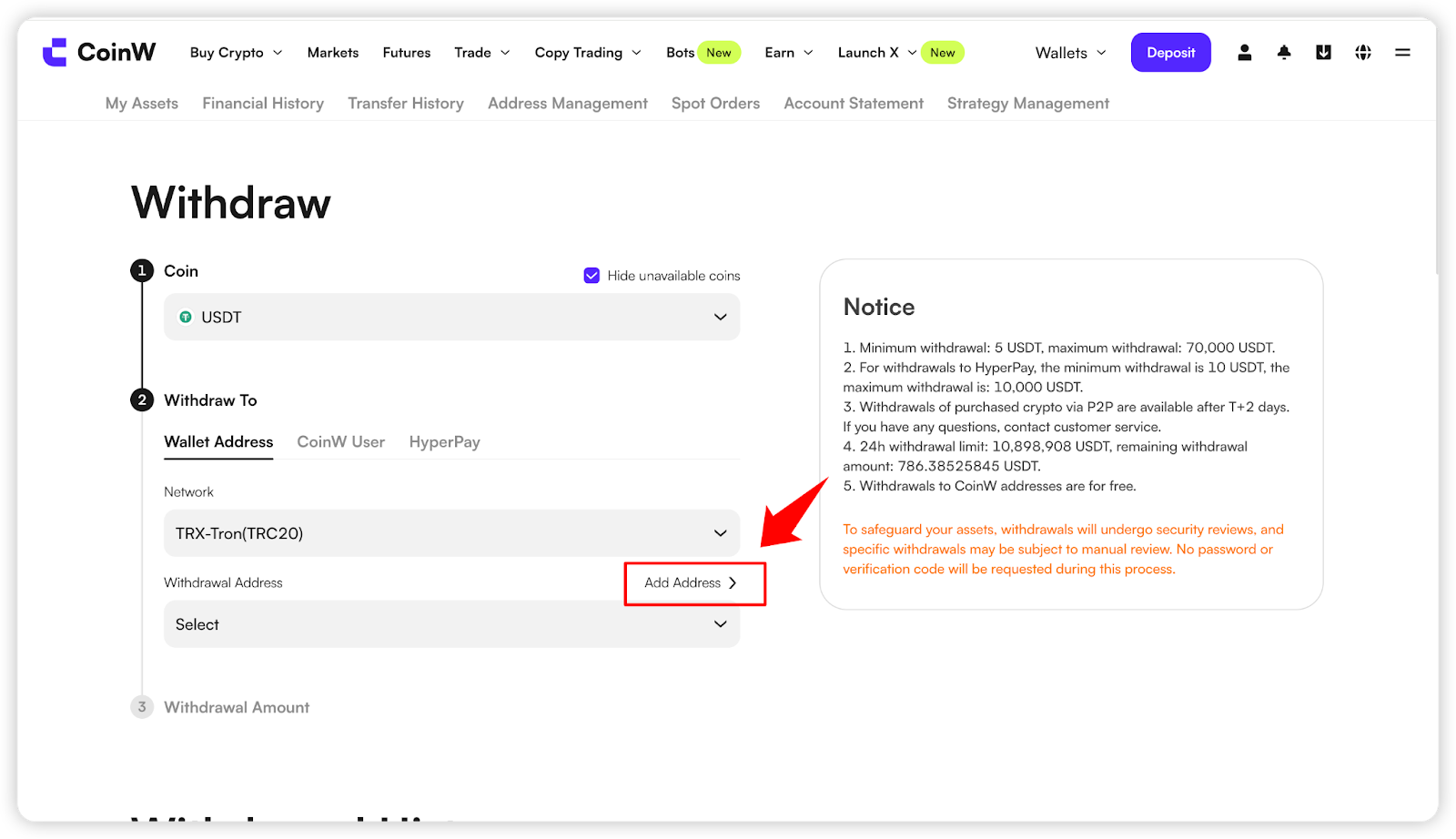
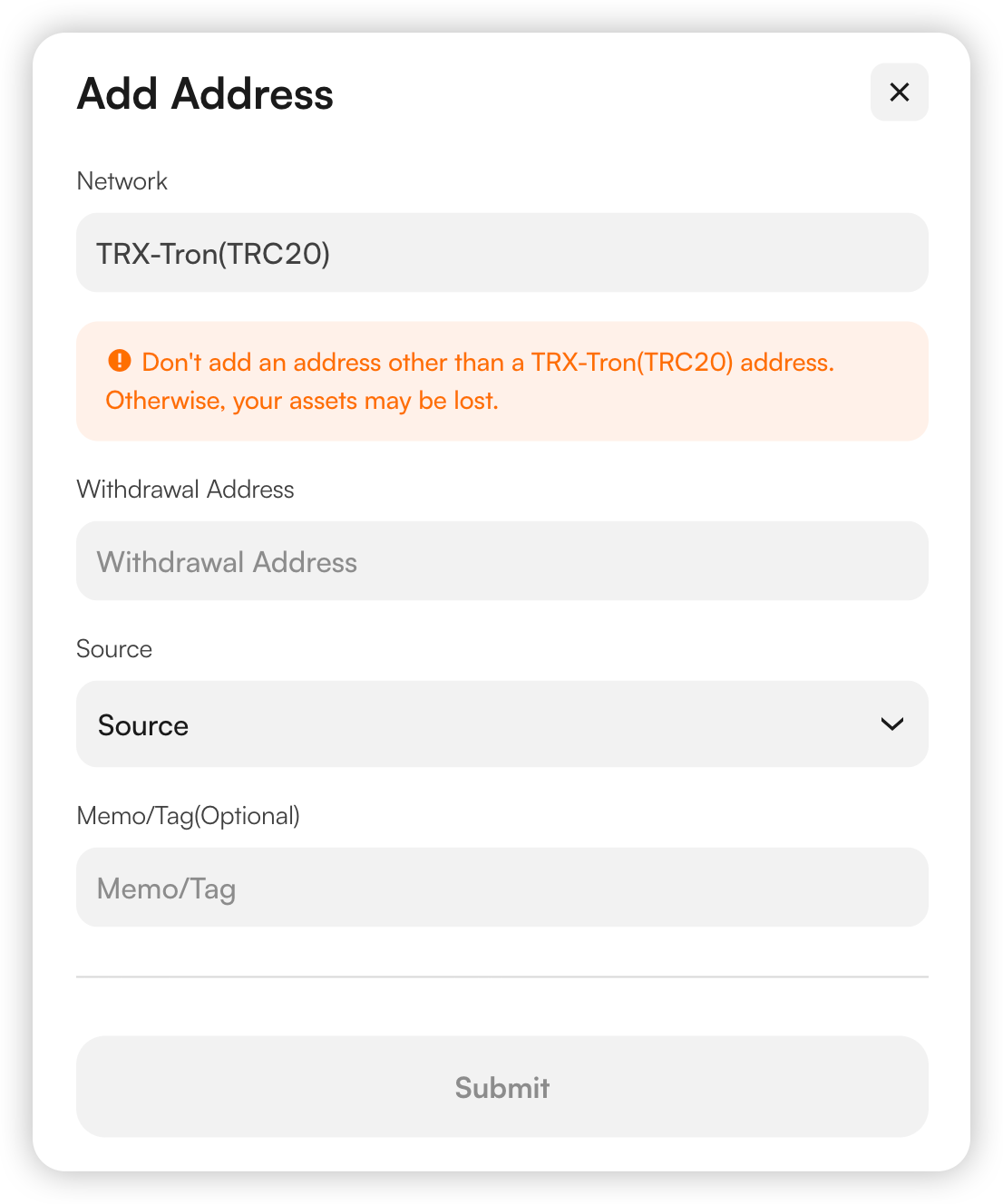
(2) Select the cryptocurrency for withdrawal, choose the withdrawal method as 【Wallet Address】 and select the mainnet type.If you haven't added an address to your account, you need to do so before proceeding with the withdrawal. Click on 【Add Address】, paste the withdrawal address, choose the address source, add a withdrawal memo (optional), and click 【Confirm】 after verifying the information to proceed with the withdrawal.
(3) After successfully adding the address, you can select the added address to initiate the withdrawal.
APP
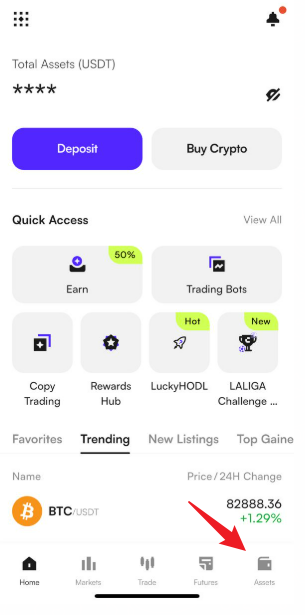
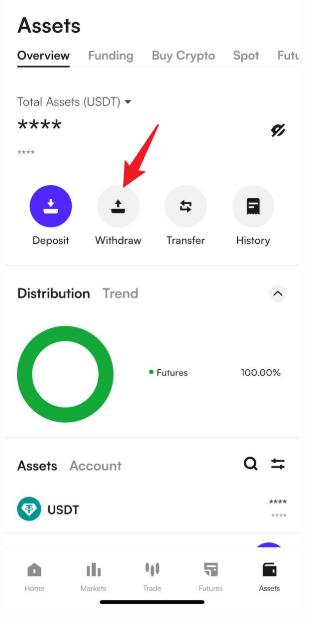
(1) Open the CoinW APP and click the "Assets" button in the bottom navigation bar to enter the asset interface;
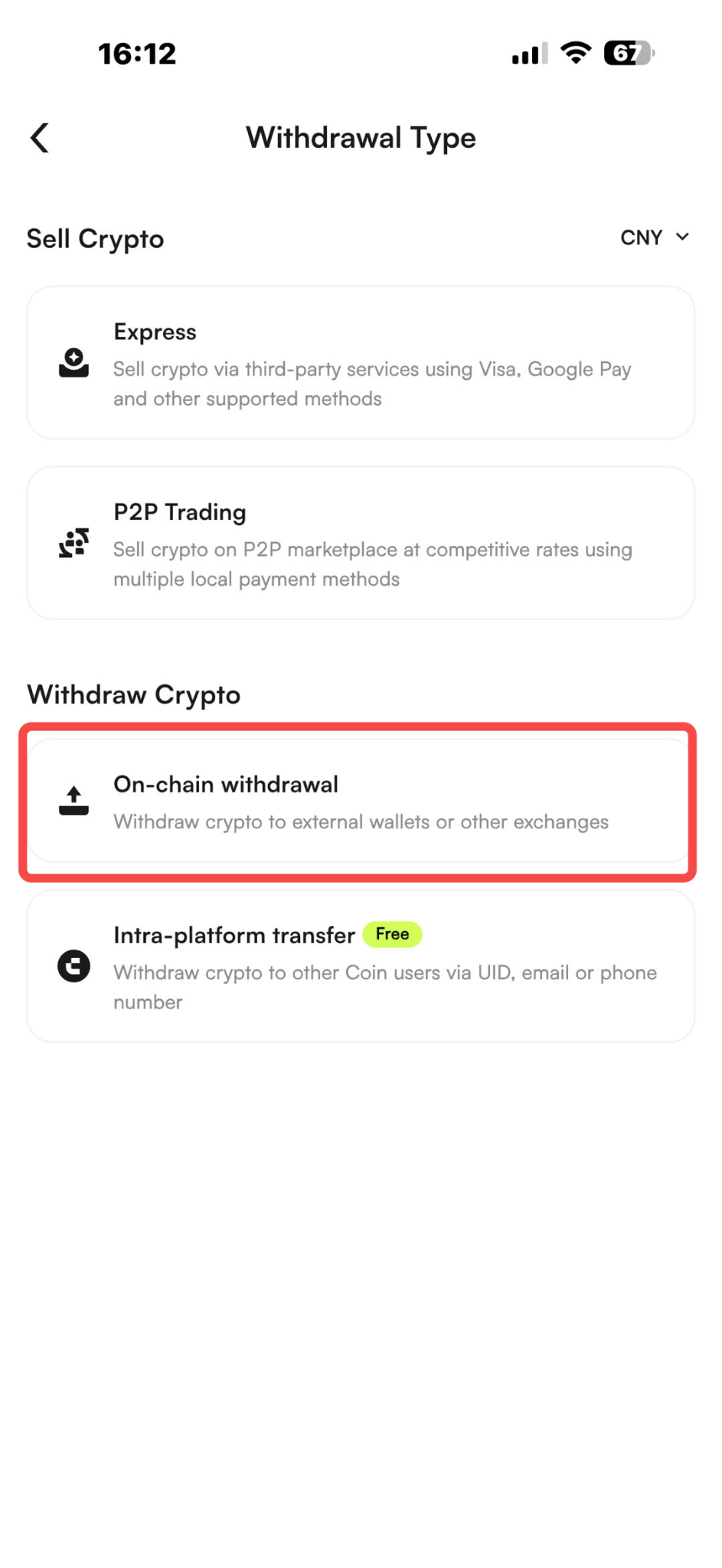
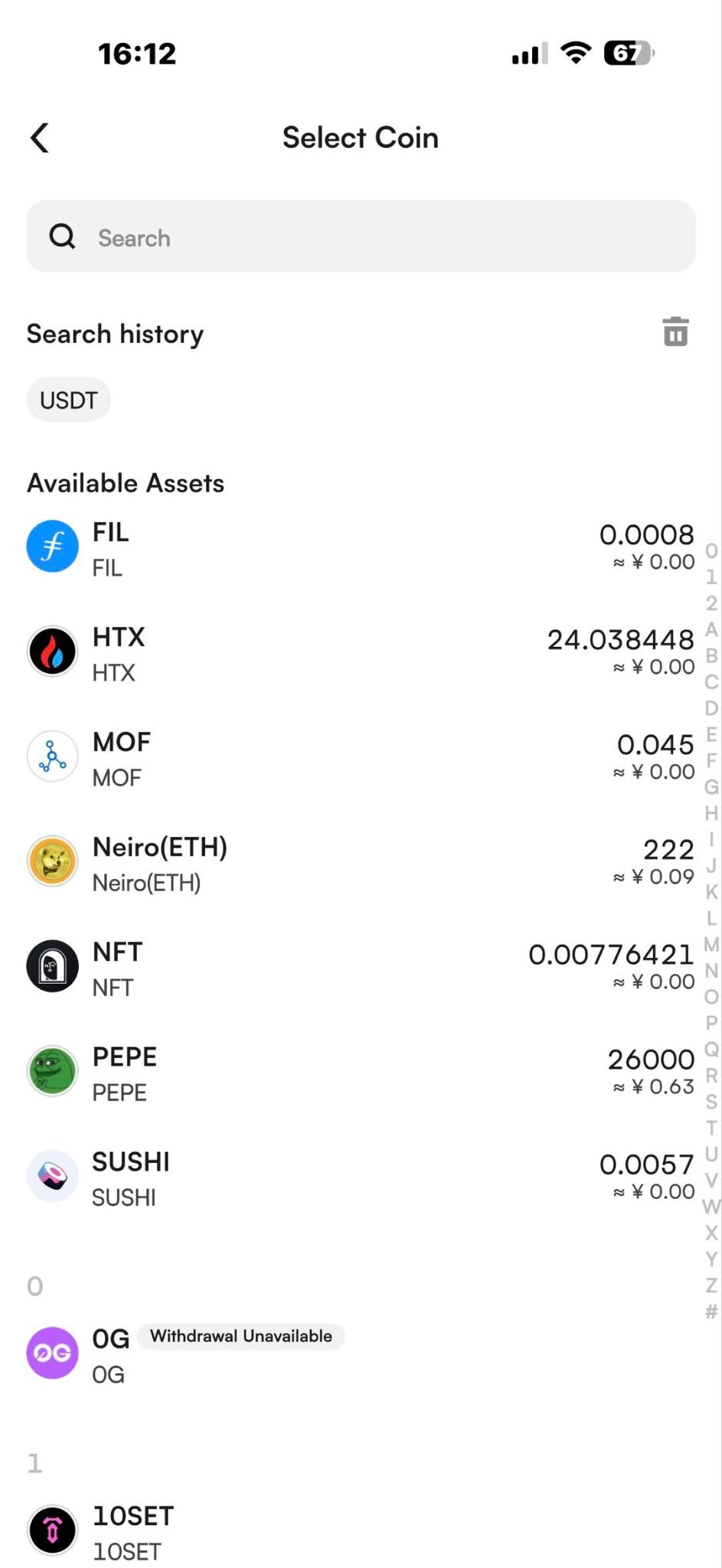
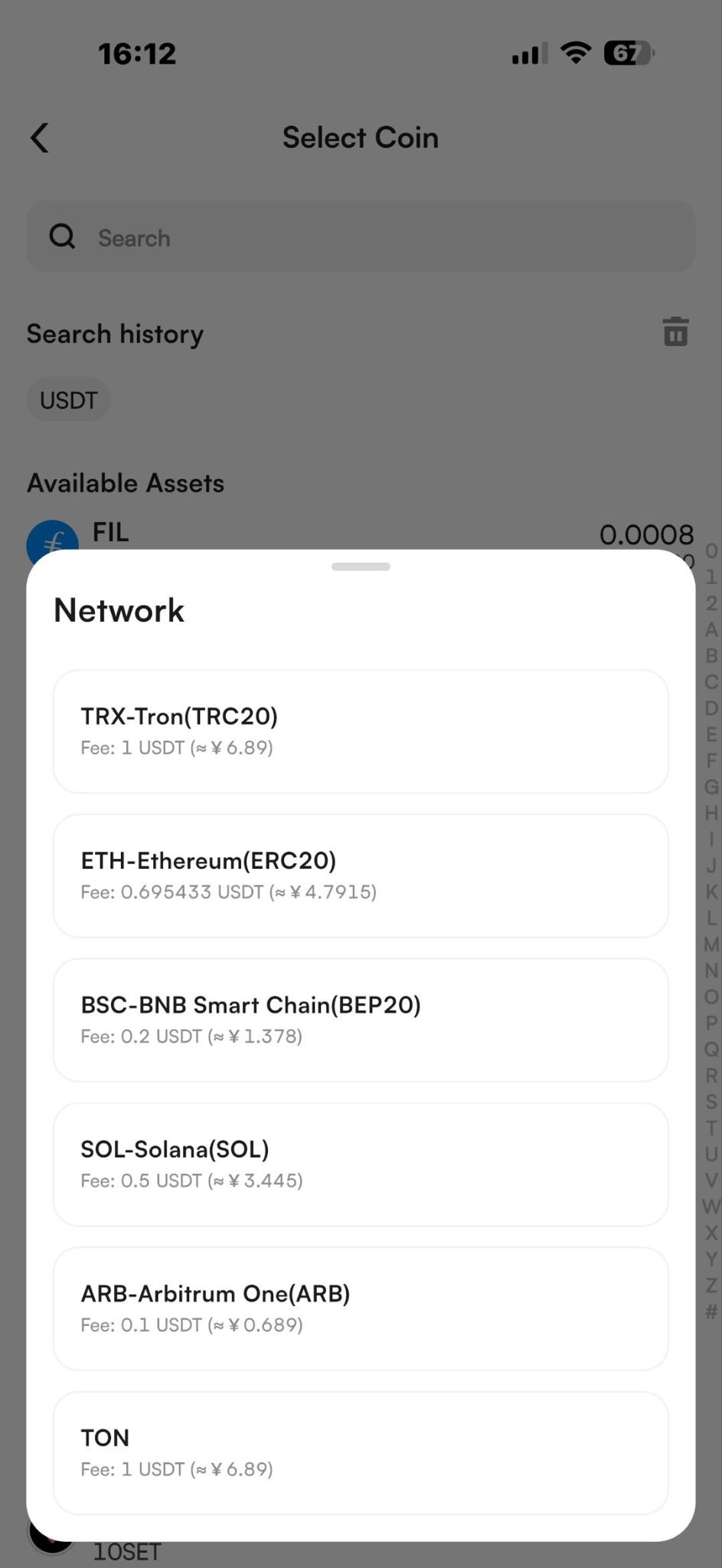
(2) Click the "Withdraw" button at the top, select the cryptocurrency you want to withdraw, select "On-Chain Withdrawal," and choose the cryptocurrency and mainnet type;
(3) After entering the withdrawal interface, you can directly enter your withdrawal address to withdraw funds;
If your address book already contains a withdrawal address, you can click the "Address Book" button to select an address directly from your address book;
You can click the "Scan" button to scan the QR code to add an address;
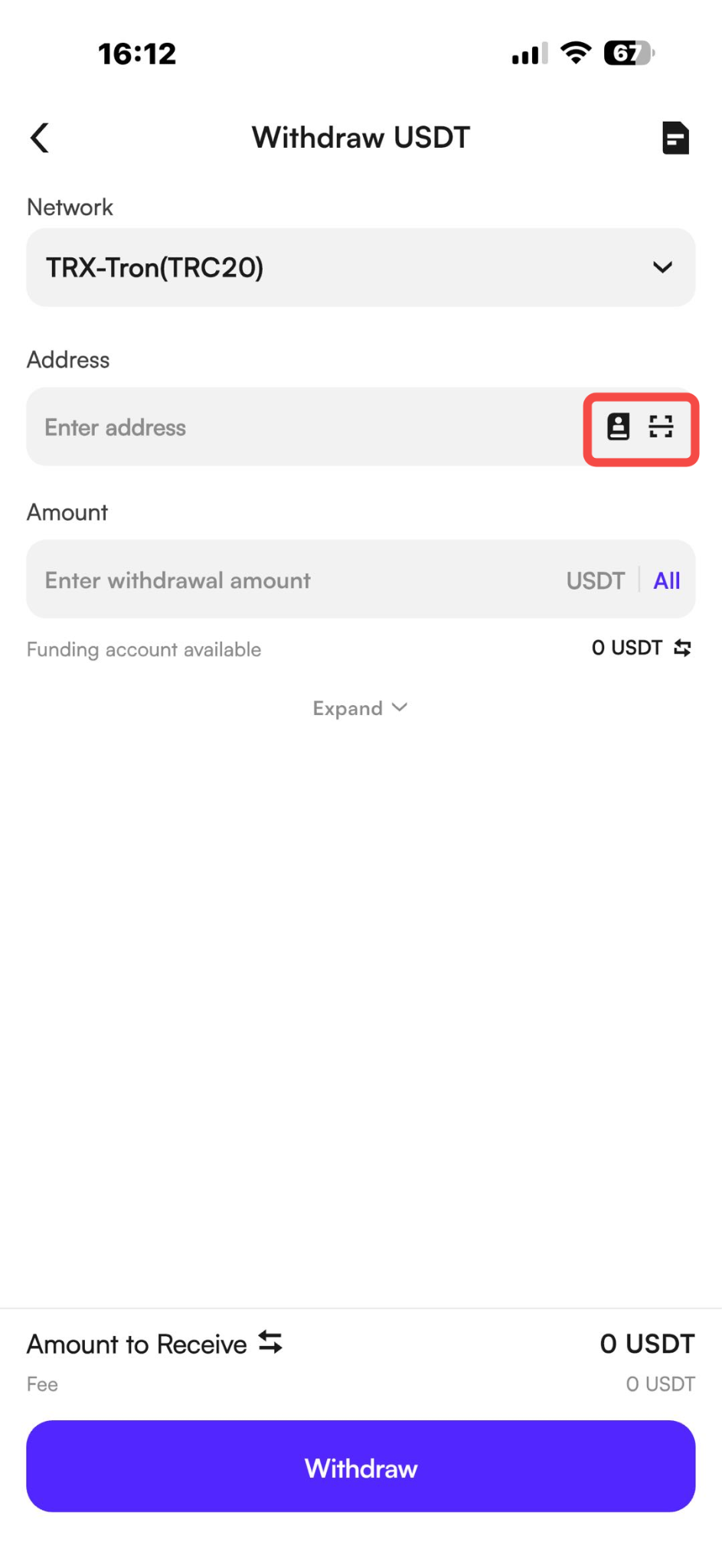
(4) After filling in the address, enter the withdrawal amount to initiate the withdrawal;
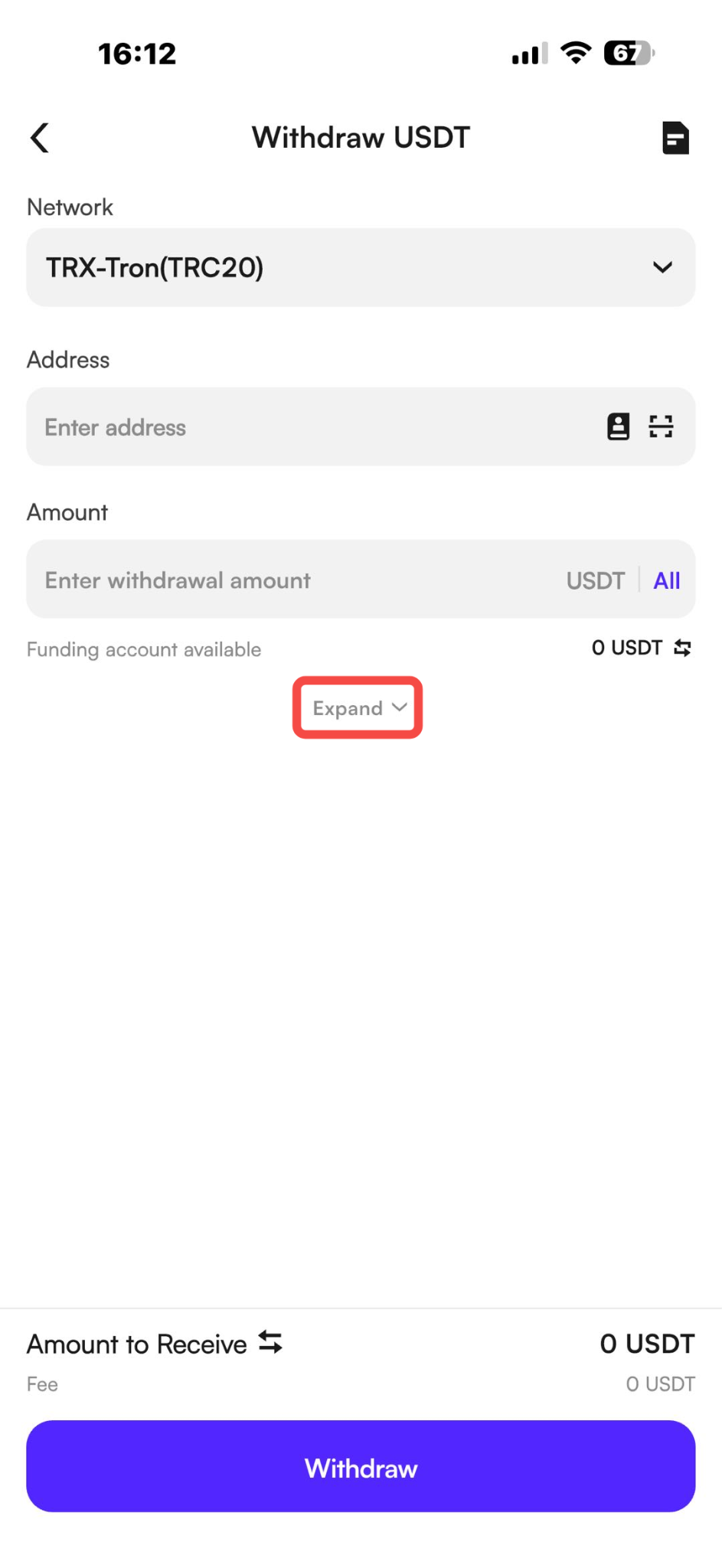
(5) You can also click the "More" button below to expand the withdrawal instructions:
Contract Address
Withdrawal Limit Explanation
Withdrawal Fee Explanation
Notes
(1) Once a withdrawal is approved, it cannot be withdrawn. Please carefully verify the address, contract address, and other information;
(2) The withdrawal network must be consistent with the network to which the address belongs. An incorrect network may result in the withdrawal not being credited;
(3) For some cryptocurrencies, MEMO must be entered for withdrawal. Only then will the funds arrive. If a MEMO is required, please fill it in as instructed to avoid any issues with the funds not being credited.
Withdraw To CoinW User
If you wish to withdraw assets to another CoinW account, you can choose the internal transfer option.
The process is the same as a regular withdrawal—simply select [CoinW User] as the withdrawal method.
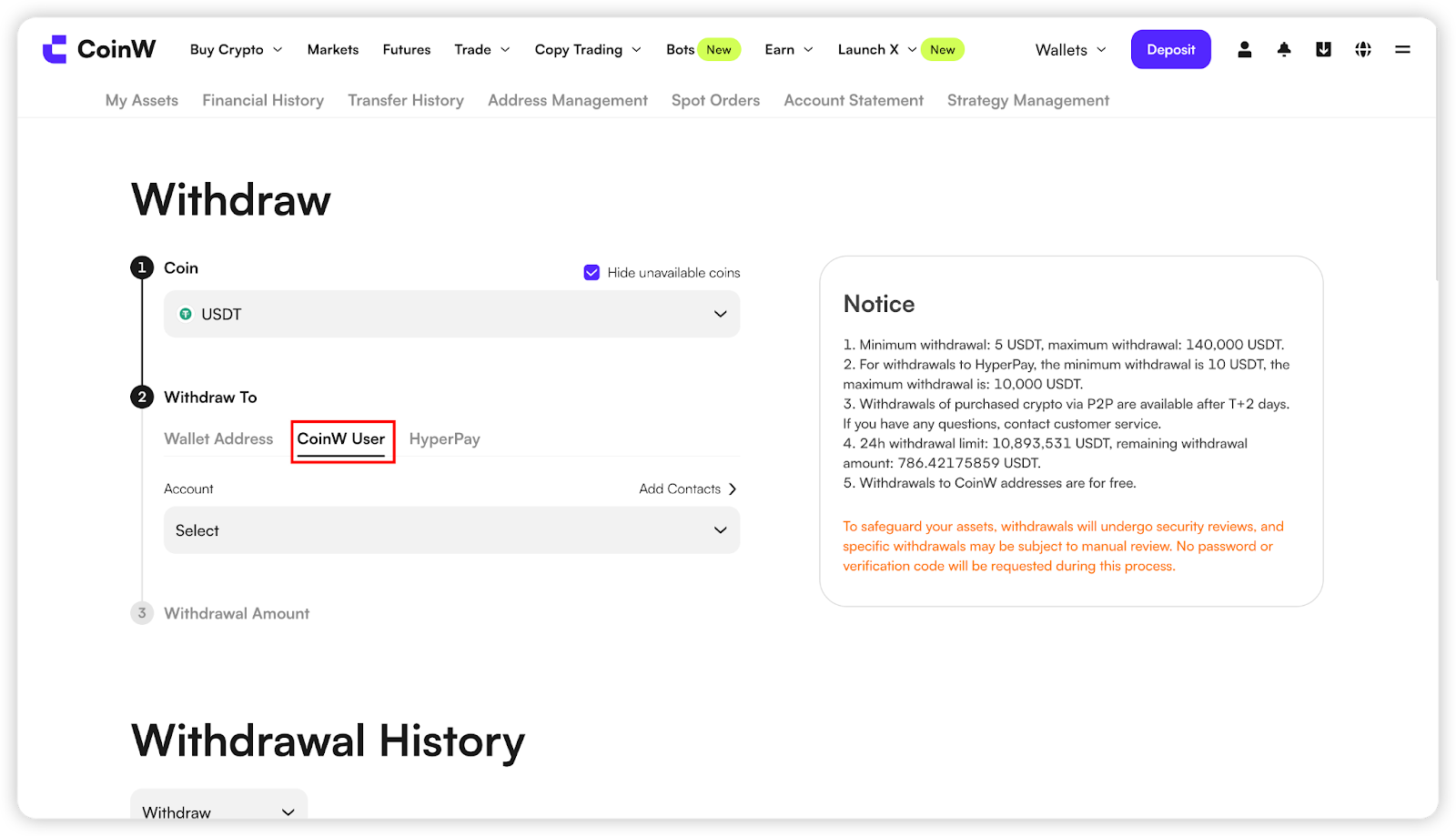
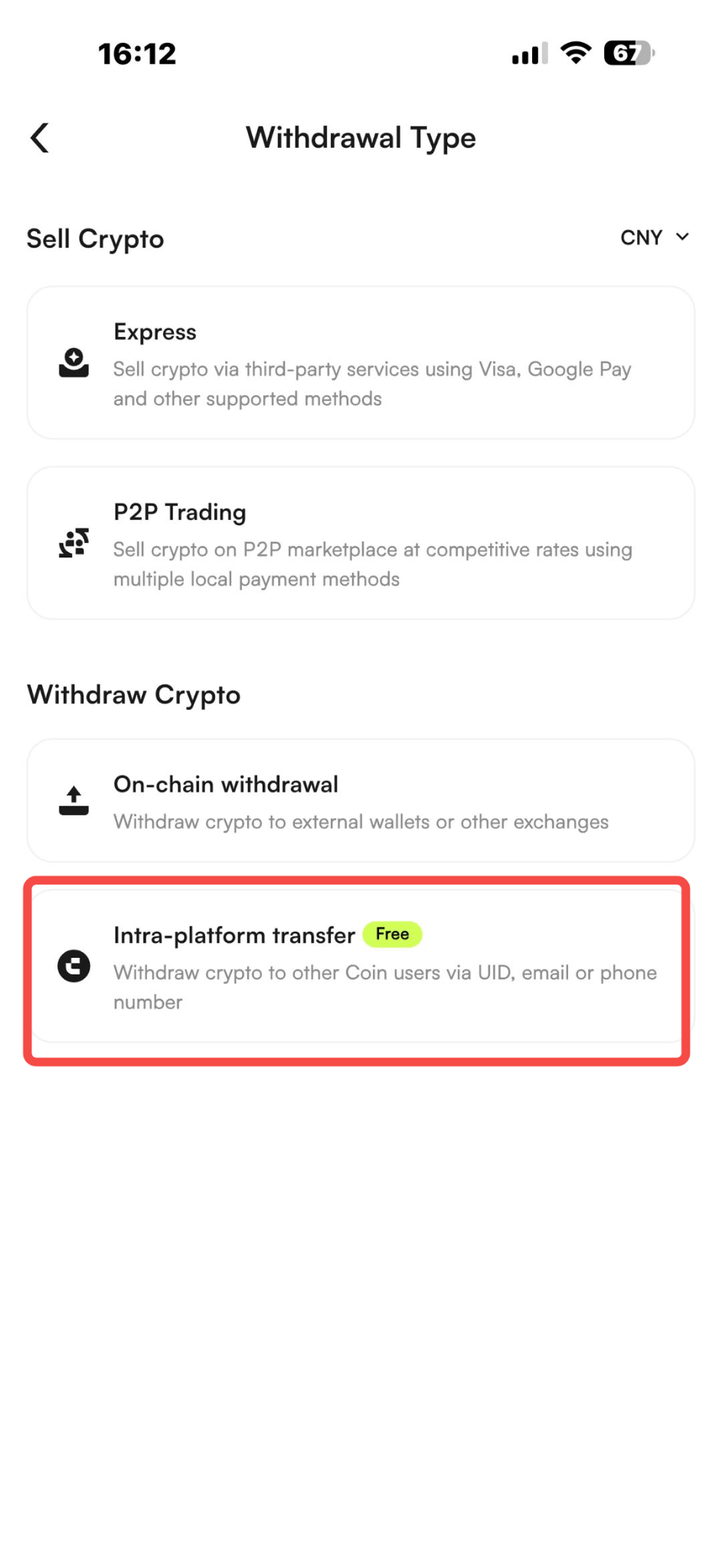
With internal transfers, you can enjoy zero fees and instant arrival. You only need the recipient’s UID, phone number, or email to complete the transfer successfully.
FAQ
Q: How should I fill in the withdrawal address memo?
A: The withdrawal address memo is optional. If you're unsure how to fill it out, you can leave it blank. However, if you choose to fill it, you can use any convenient identifier for easy recall, such as "John's address," etc.
Q: What is a Memo, and is it necessary to fill it out?
A: If the recipient requires a Memo, it's crucial to include it; otherwise, the funds may not be credited.
If the recipient doesn't request a Memo, ensure the following:
(1) Ensure that both parties support the same network for the cryptocurrency.
(2) If the networks match and the recipient doesn't require a Memo, you can fill in any random number or leave it blank.
Incorrect Memo input may result in non-crediting of funds. If you're unsure whether to fill it out, please contact customer service for confirmation.
Q: How can I check withdrawal fees and limits?
A: Withdrawal fees vary for each cryptocurrency, and fees may differ across different networks for the same cryptocurrency. Please refer to the withdrawal interface for the displayed fees.
Q: Why is there a T+2 or 24-hour limit on withdrawals?
A: This is part of the platform's risk control measures. For example:
If you purchase USDT in trading, withdrawals may require a 48-hour waiting period, known as T+2.
If you modify security verification information such as changing passwords or updating phone/email, a 24-hour wait may be necessary to ensure the security of your account.
Withdrawal Guide
If you wish to withdraw assets from your account to other exchanges or wallets, or to other CoinW accounts, you may use the platform's withdrawal function.
Blockchain Transfer
If you wish to withdraw CoinW's digital currency assets to other platforms or exchanges, you can choose to withdraw using an address. First, before withdrawing, you need to transfer the currency you wish to withdraw to your Fuding account.
WEB
(1) Log in to the CoinW official website, click on 【Wallets】 in the upper right corner to enter the asset centre interface. Click the【Withdraw】button, select the cryptocurrency you wish to withdraw, choose 【Wallet Address】 as the withdrawal method, select the mainnet type, and input the destination address. Follow the on-screen instructions to complete the withdrawal process
(2) Select the cryptocurrency for withdrawal, choose the withdrawal method as 【Wallet Address】 and select the mainnet type.If you haven't added an address to your account, you need to do so before proceeding with the withdrawal. Click on 【Add Address】, paste the withdrawal address, choose the address source, add a withdrawal memo (optional), and click 【Confirm】 after verifying the information to proceed with the withdrawal.
(3) After successfully adding the address, you can select the added address to initiate the withdrawal.
APP
(1) Open the CoinW APP and click the "Assets" button in the bottom navigation bar to enter the asset interface;
(2) Click the "Withdraw" button at the top, select the cryptocurrency you want to withdraw, select "On-Chain Withdrawal," and choose the cryptocurrency and mainnet type;
(3) After entering the withdrawal interface, you can directly enter your withdrawal address to withdraw funds;
If your address book already contains a withdrawal address, you can click the "Address Book" button to select an address directly from your address book;
You can click the "Scan" button to scan the QR code to add an address;
(4) After filling in the address, enter the withdrawal amount to initiate the withdrawal;
(5) You can also click the "More" button below to expand the withdrawal instructions:
Contract Address
Withdrawal Limit Explanation
Withdrawal Fee Explanation
Notes
(1) Once a withdrawal is approved, it cannot be withdrawn. Please carefully verify the address, contract address, and other information;
(2) The withdrawal network must be consistent with the network to which the address belongs. An incorrect network may result in the withdrawal not being credited;
(3) For some cryptocurrencies, MEMO must be entered for withdrawal. Only then will the funds arrive. If a MEMO is required, please fill it in as instructed to avoid any issues with the funds not being credited.
Withdraw To CoinW User
If you wish to withdraw assets to another CoinW account, you can choose the internal transfer option.
The process is the same as a regular withdrawal—simply select [CoinW User] as the withdrawal method.
With internal transfers, you can enjoy zero fees and instant arrival. You only need the recipient’s UID, phone number, or email to complete the transfer successfully.
FAQ
Q: How should I fill in the withdrawal address memo?
A: The withdrawal address memo is optional. If you're unsure how to fill it out, you can leave it blank. However, if you choose to fill it, you can use any convenient identifier for easy recall, such as "John's address," etc.
Q: What is a Memo, and is it necessary to fill it out?
A: If the recipient requires a Memo, it's crucial to include it; otherwise, the funds may not be credited.
If the recipient doesn't request a Memo, ensure the following:
(1) Ensure that both parties support the same network for the cryptocurrency.
(2) If the networks match and the recipient doesn't require a Memo, you can fill in any random number or leave it blank.
Incorrect Memo input may result in non-crediting of funds. If you're unsure whether to fill it out, please contact customer service for confirmation.
Q: How can I check withdrawal fees and limits?
A: Withdrawal fees vary for each cryptocurrency, and fees may differ across different networks for the same cryptocurrency. Please refer to the withdrawal interface for the displayed fees.
Q: Why is there a T+2 or 24-hour limit on withdrawals?
A: This is part of the platform's risk control measures. For example:
If you purchase USDT in trading, withdrawals may require a 48-hour waiting period, known as T+2.
If you modify security verification information such as changing passwords or updating phone/email, a 24-hour wait may be necessary to ensure the security of your account.